Your people already do the work. JZA Time OS watches which client file is open in Caseware, Excel, Acrobat or Xero and writes the timesheet as they go — so on Friday the hours are already there, instead of being reconstructed from memory.
Free for a month, no card, Windows 10 or 11. You can have it running this afternoon.
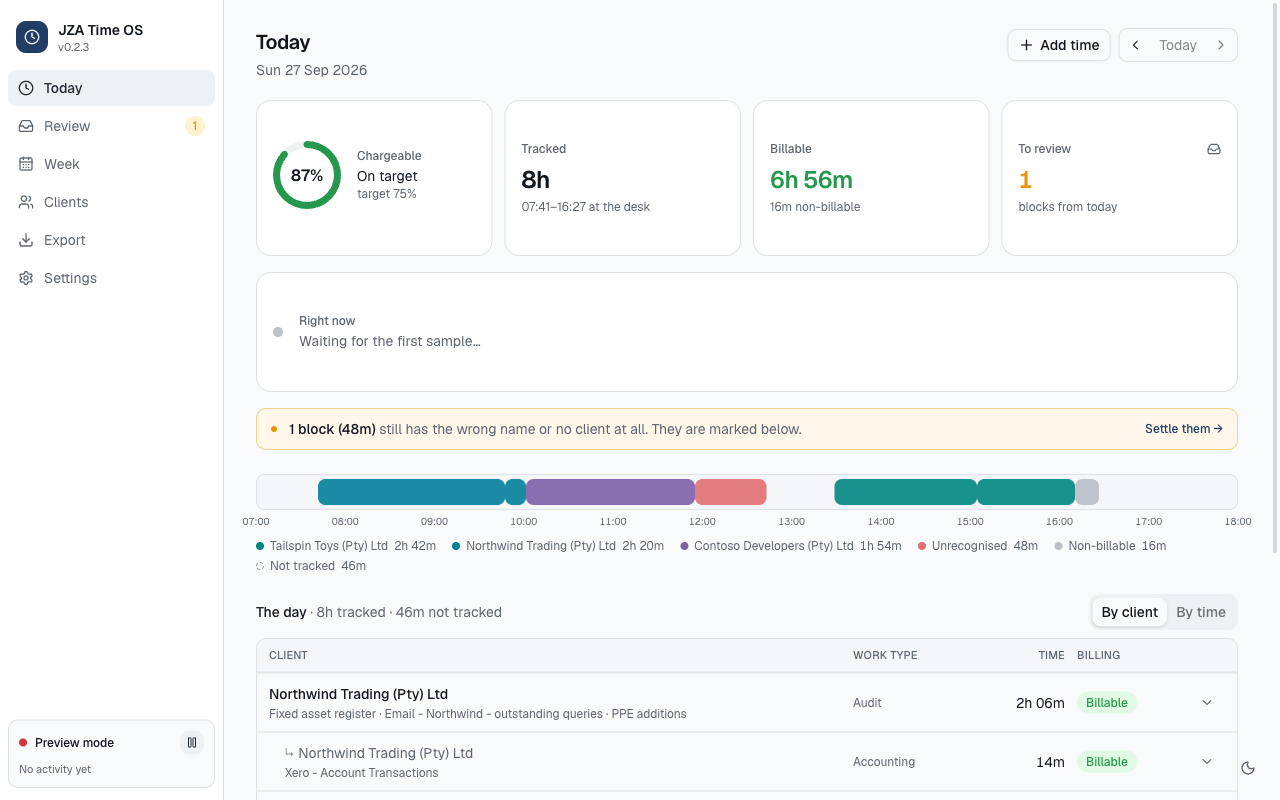
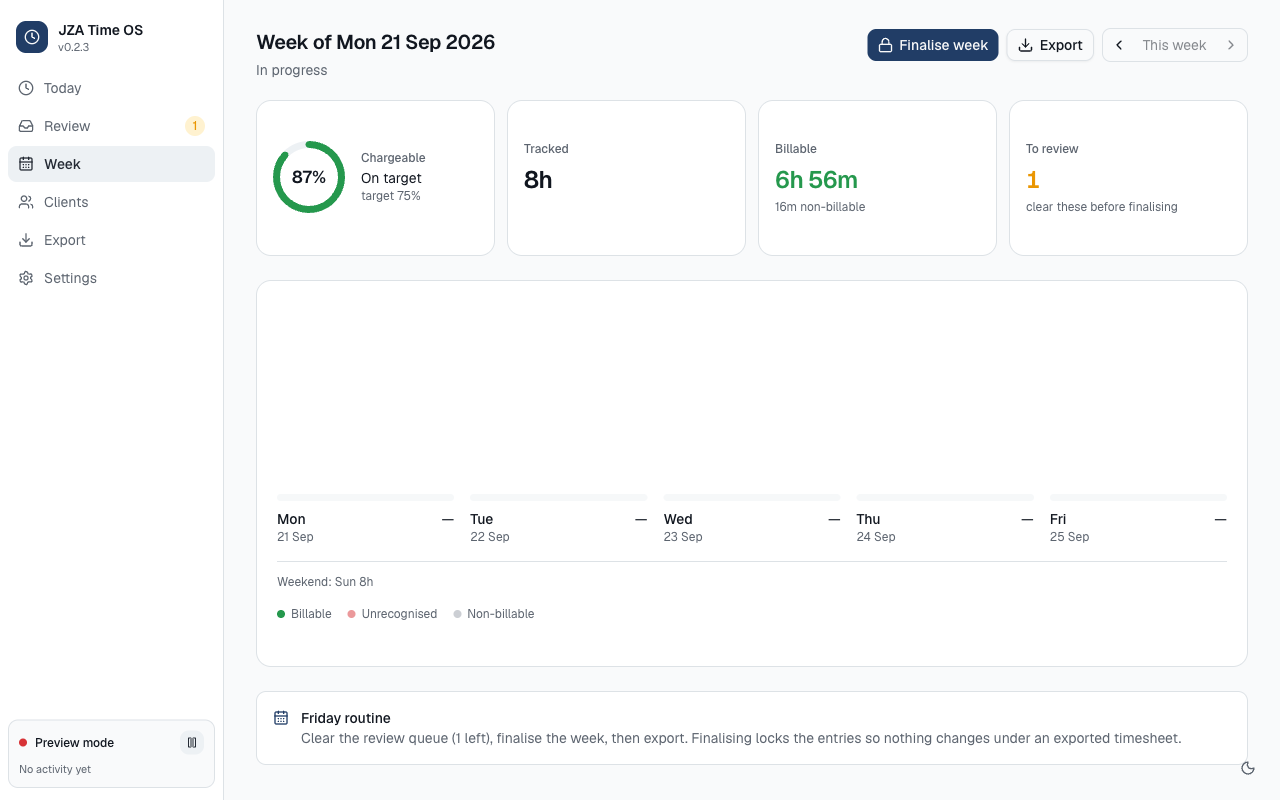
A real day as the app recorded it. Client names here are invented.
The problem
Time written up on Friday is time written off.
Nobody remembers Tuesday afternoon by Friday. The half hour on a query, the call about a client who isn't billed for it, the section paper opened between two other jobs — it goes in as a round number, or it doesn't go in at all. The firm carries the difference.
83.5%of tracked time was attributed to the right client automatically, measured over a real month of one auditor's work
20sfrom opening a client's file to the app knowing whose time it is
5minto check and confirm a whole day, at the end of it, while it is still fresh
The first figure is from our own testing against a month of genuine window activity at a working audit firm. It is the proportion the app placed without being asked — not a claim about how much extra you will bill.
How it works
Three things, and only one of them is yours to do.
All day
It reads the title of the window in front — the client and the section paper are usually in it. Nothing is typed, no timer is started, no button is pressed.
At five o'clock
You look at the day and confirm it. Anything the app could not place is in one list, grouped, with the client it thinks is most likely already filled in. Most days this is a few clicks.
At month end
Export the file for your practice-management system, or read the firm-wide view: hours per person, per client, and the chargeable percentage against your target.
Caseware Working PapersCaseware ViewExcelWordAcrobatXeroSage Business CloudOutlookTeams callsFile Explorer folders
For an Excel file it also reads which client folder the workbook was opened from, which is how it tells one firm's “Revenue 2026” from another's.
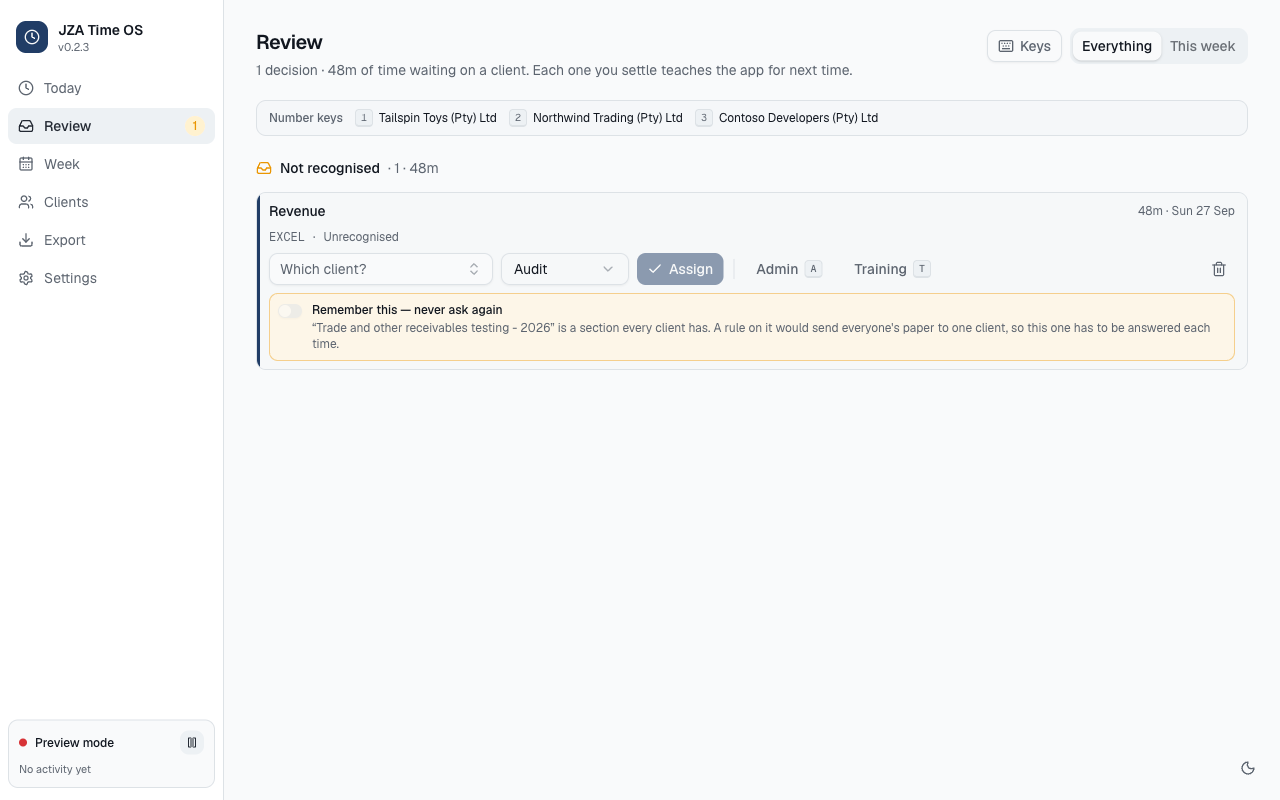
The five o'clock list. Identical items are grouped, so one decision can settle forty of them.
Click through the day it came from.
Eight steps, about two minutes, nothing to install: one before the first day, six through one recorded day, and the one a partner opens on Monday. The day in the middle is the day in the screens above — eight hours tracked, forty-six minutes not, one block it could not place — rebuilt here so you can watch the mechanism rather than read about it.
Your client list goes in. Once.
Before the first day
Client Summary.xlsx - Excel
A GreatSoft client list export: the word “Client” over the column of codes, an empty column B, and the client names in column C.
Row
A
B
C
1
Client
2
NWT001P
Northwind Trading (Pty) Ltd
3
CON002P
Contoso Developers (Pty) Ltd
4
TAI003
Tailspin Toys (Pty) Ltd
1,281 more rows
Column A read as GreatSoft codesColumn C read as client names1 heading row skipped
Clients1,284 on file · none worked this month yet
The Clients screen after the import: 1,284 clients on file, none worked yet.
Client
Code
This month
Billing
Not worked yet1,284 · On file from your client list. No time has been recorded against them.
Northwind Trading (Pty) Ltd
NWT001P
—
Billable
Contoso Developers (Pty) Ltd
CON002P
—
Billable
Tailspin Toys (Pty) Ltd
TAI003
—
Billable
1,284 added
One file, once, and from then on it is your client list the app matches against — your names, your GreatSoft codes, ready for the export at the other end. It reads .xlsx, CSV or tab-separated, and it works out which column is which by what is in the column, not by what the heading calls it: in a real firm's export the single word “Client” sat over the column of codes. Re-import the same file and nothing changes, and Undo the last import is on the same screen.
Nobody typed anything. No timer was started, no button was pressed. The title bar of the window in front already says whose work this is, and the app takes it from there — about twenty seconds after the file opens.
A block lands on the timeline.
07:41 – 09:47
Tracked2h 06m
Billable2h 06m
To review0
07:0009:0011:0013:0015:0017:00
Northwind Trading (Pty) Ltd · Audit · 2h 06m
The block runs from the moment the window came forward to the moment it stopped being the window in front. Two hours and six minutes, to the minute, without anyone deciding to record it.
The dashed stretch at lunch is forty-six minutes away from the keyboard, and it is not in the total. The app does not invent time nobody worked — which is the only reason a partner can sign the sheet it produces.
One it cannot place.
11:55 – 12:43
Revenue - 2026.xlsx - Excel
The app never looks inside the document.
read as
Client
Not in the title — and the folder it was opened from did not settle it either
Work type
Audit
Description
Revenue
1 block (48m) has no client. It is marked on the timeline and waiting in Review.
“Revenue - 2026” is a paper every client has. For an Excel file the app also checks which client folder the workbook came from; when that does not settle it either, it does not guess. Forty-eight minutes go to the review list instead. Roughly one block in six lands here.
It will not make a rule out of this one. “Revenue - 2026” is a section every client has. A rule on that name would send everyone's paper to one client, so this question gets asked each time.
Settled — 48m to Tailspin Toys (Pty) Ltd, Audit, billable.Nothing left to review. The day is ready to finalise.
Tracked8h 00m
Billable7h 44m
To review0
One list, grouped, at the end of the day while it is still fresh — not a fortnight later from memory. Pick a client and press Assign, or press 1.That was the day's only question, and it took one keystroke. On a normal day this is the whole of the work the app asks of anyone.
The file comes out.
Month end
Writes a CSV in the shape GreatSoft's import expects. Rows are flagged once exported so they are not sent twice.
Export 7 rows
1 item in this range has not been reviewed. It will export with the app's best guess — step back and settle it.
The day's exported rows: 7 rows, 8.00 hours.
Date
Client
Work type
Description
Start
End
Hours
Billable
2026-09-27
Northwind Trading (Pty) Ltd
Audit
Fixed asset register
07:41
09:47
2.10
Yes
2026-09-27
Northwind Trading (Pty) Ltd
Accounting
Xero - Account Transactions
09:47
10:01
0.23
Yes
2026-09-27
Contoso Developers (Pty) Ltd
Audit
Meeting - Contoso Developers - audit planning
10:01
11:55
1.90
Yes
2026-09-27
Tailspin Toys (Pty) Ltd
Audit
Revenue - 2026
11:55
12:43
0.80
Yes
2026-09-27
Tailspin Toys (Pty) Ltd
Audit
01.10 - Financial statements - SME
13:29
15:05
1.60
Yes
2026-09-27
Tailspin Toys (Pty) Ltd
Tax
Provisional Tax
15:05
16:11
1.10
Yes
2026-09-27
Admin
Admin
Email
16:11
16:27
0.27
No
Rows7
Hours8.007.73 billable
Unreviewed in range0
Seven rows, eight hours, and nobody typed a line of it. The import into GreatSoft is still a step someone does — the app produces the file, it does not push into GreatSoft, and it will not claim otherwise until that has been proven on a real import.
JZALitware Audit Inc
Today
People
Clients
Export
Periods
Activity
Reports
What the partner sees.
Sun 27 Sep
Today
Sun, 27 Sep 2026 · What each person's desktop app has sent for this day. Not a live feed — the figures move when a device sends, which is roughly every fifteen minutes.
Tracked27h 26m4 of 5 people reporting
Billable22h 41m
Chargeable83%of tracked time
Needs review6blocks left for someone to confirm
1 person has sent nothing for this day: Patti Fernandez
The firm's day: five people, four reporting, 27 hours 26 minutes tracked.
Person
Tracked
Billable
Chargeable
Clients
Review
Last seen
Version
Adele Vance
8h 00m
7h 44m
97%
3
0
4 min ago
0.2.3
Diego Siciliani
7h 12m
6h 05m
84%
4
2
11 min ago
0.2.3
Lynne Robbins
6h 48m
5h 30m
81%
2
1
9 min ago
0.2.3
Nestor Wilke
5h 26m
3h 22m
62%
3
3
22 min ago
0.2.2
Patti Fernandeznothing sent for this day
—
—
—
—
—
yesterday
0.2.3
JZA Time OS firm console · times are SAST · a day view, refreshed — not a live feed
The top row is the day you have just watched, in the firm's table. Nobody was asked for it, nobody filled anything in, and it is the timesheet, not a surveillance feed — it says Nestor recorded 5h 26m, not that Nestor is in Sage right now. Each person joins it once by typing a pairing code into their own app, and what crosses is the timesheet they can already see: client, work type, description, times. Never window titles, never file names. At month end this is one export for the whole firm, or one file per person — the same rows, the same shape as the step before. And plainly: the app has been recording real audit work since September 2026, but no firm has run the console for a full month yet.
Step 1 of 8
Every client, every person and the firm itself are invented, as in the app's own tests. The figures are the day in the screenshots on this page: 8h tracked, 46m away from the desk, one 48m block to settle, seven rows out — and that same day is the first row of the firm's table in the last step.
What it recovers
Put your own numbers in.
We don't know your charge-out rate and we are not going to invent one. Enter what your firm actually bills and how much time you think each person loses in a day, and this does the arithmetic in front of you.
People whose time gets billed
What a client is billed for an hour of their time
Time worked but never written up. Thirty minutes is a conservative guess.
Per cent. Not all of it, and anyone who promises all of it is selling you something.
Recovered billable time, per month
R 0
Hours recovered a month, across the firm
0
Cost of the software a month
R 0
Net, per month
R 0
Over a year
R 0
Assumes 21 working days. This is arithmetic on your own figures, not a promise — the only number here we can stand behind is the price.
What it records
Your staff will ask this first. Here is the honest answer.
A tool your people resent is a tool nobody runs. This one is built to survive being explained to the person it is watching — the welcome screen says all of this before anyone agrees to it.
It records
Which application is in front
That window's title — usually the client and the section
For Excel, the folder the file was opened from
Whether the person has been away from the keyboard
It never records
Screenshots or screen recording, ever
Anything typed, or the clipboard
The contents of documents, emails or web pages
WhatsApp, banking, password managers, personal mail — blocked by default
Everything stays on that computer unless the firm connects it to the console, which the person does themselves with a code. What crosses is the timesheet they can already see: client, work type, description, times. Never window titles, never file names. They can pause it, read every record, disconnect it, or delete the lot.
For the partner
The firm's week, without asking anyone for it.
Hours per person and per client, the chargeable percentage against target, who has not recorded anything today, and one export at month end instead of chasing eight files. It is a day view, refreshed — not a live feed of what people are doing, which is a different promise and a worse product.
Founding firms. The first three firms pay R2,500 a month flat for up to ten timekeepers, fixed for twelve months, and the setup fee is waived. In exchange we want your honest feedback and, if it earns it, a reference. The first month is free either way — we would rather you find the problems before you pay for it.
Start
Try it on real work, this week.
The first month is free. There is no card, no contract and nothing to cancel — when the month is up we ask you whether to carry on, and if the answer is no, that is the end of it. Put it on one or two machines, work the way you already work, and read the timesheet it wrote.
Download it
Version 0.3.5 · 13 October 2026 · 107 MB · Windows 10 or 11
That opens our releases page on GitHub. The newest build is at the top — take the file ending .exe. It is a public page, so there is nothing to sign into. This is the only installer anyone in your firm downloads: from here the app updates itself.
That opens your own email with the message already written; nothing on this page collects anything. It is worth thirty seconds because we watch the first week of every firm by hand — if we know you have installed it, we check on the first day's recording and come back to you about what it got wrong.
What you get
The app on every timekeeper's machine, for a month, at no cost
Your client list imported from your GreatSoft export, names and codes
The month-end CSV in the shape GreatSoft's import expects
Every update, automatically
The firm-wide view, which we set up with you if you want it
What we ask
Install it on machines doing real client work, not a spare laptop
Work normally for a fortnight. Do not perform for it
Confirm the client names it finds, once
Tell us what it got wrong — in the app, or by email
That is all of it. No card, no contract, no notice period
After the month
R549 per timekeeper a month. Partners, managers and admin who only read are free
Or, if you are one of the first three firms, R2,500 flat for up to ten timekeepers, fixed for a year
Nothing starts charging by itself. We ask, and you decide
Your data stays yours. Export the lot, any time
It is young, and you should know how young. It has been recording real audit work at one firm since September 2026, and it is corrected weekly — four releases in the five days to 27 September, each one from something an auditor hit that morning. You will find things. That is what the free month is for: find them before you have paid for anything.
Getting started
The first day, start to finish.
Four steps. The longest of them is the two minutes Windows spends being suspicious of an installer it has not seen before.
Install it.
Windows 10 or 11 only — there is no Mac version and none planned this year. It installs for one user, so nobody needs an administrator password. About two minutes.
Windows will try to stop you, and that is expected. The installer is not yet signed with a certificate — we have not bought one — so Windows shows a box saying it protected your PC. Click the small More info link, then the Run anyway button that appears underneath it.
Windows protected your PC
Microsoft Defender SmartScreen prevented an unrecognised app from starting. Running this app might put your PC at risk.
More info — click this first
Run anywayDon't run
Windows draws this box in blue; this is a sketch of it in the page's own colours. “Run anyway” only appears after you click “More info”.
Your browser may also say “this type of file can harm your computer”. Choose Keep. It says that about every installer it has not seen before. If your firm's security software blocks it outright rather than warning you, that one is for IT, not for you.
Switch it on, and check one corner.
The welcome screen lists what the app records and what it never records, in the same words as this page. Leave Start with Windows switched on so no day gets missed, and press Start tracking.
Then look at the bottom-left of the window. A green dot and the word Tracking is the whole of the day-one check. Anything else — “Preview mode”, “Stopped”, a yellow bar across the top — means the Windows side of the app did not start on that machine, and we want to know before you spend a day on it.
Close it and forget about it.
Close the window with the X. That does not quit it — it carries on in the tray, next to the clock, sometimes hidden under the small arrow. Right-click there to pause it for fifteen minutes or an hour if the next call is a private one; it resumes by itself. Lock your PC as you always do, and locked time is not counted as work.
It checks for a new version on startup and once a day, and installs it when you say so. Nobody downloads an installer again.
At five o'clock, read Today.
Open it from the tray. It should read like the day you actually had: the right clients, in the right order, with the hours in the right places and, under each one, what you were doing.
Whatever it could not place is waiting on Review — pick the client and tick Remember this so it never asks about that file again. Then Clients → Needs confirming, where every client it met for the first time is listed for you to confirm. That is the whole of the training. There is no other setup.
Do this on the day, not on Friday. The five minutes is only five minutes while you still remember the afternoon.
When something goes wrong — and in the first weeks it will.
Two routes, and both of them reach a person.
Report a problem, from inside the app
In the app, and on the tray icon's right-click menu. It collects the diagnostics itself and then shows you every character of what it is about to send, before anything leaves the machine.
Client names are replaced with [client] throughout, including in the sentences you typed. You get a reference number either way: paired to your firm's console it posts there, and unpaired it writes the file and opens the folder so you can send it on.
Or tell a person
Email hello@jzatimeos.co.za. It reaches the people who build it, and it gets answered the same day.
Quote the reference number if you have one, and say which file was open when it went wrong. A client the app named badly is worth sending too: those are what it is tuned on, and most of them are fixed inside the week.